Plugin Downloads
Free GB Studio 4.2 plugins for Game Boy Color development — engine modifications, audio tools, and UI utilities.
plugins/ folder.
Afterburn Theme
IDE Theme GB Studio 4.2.x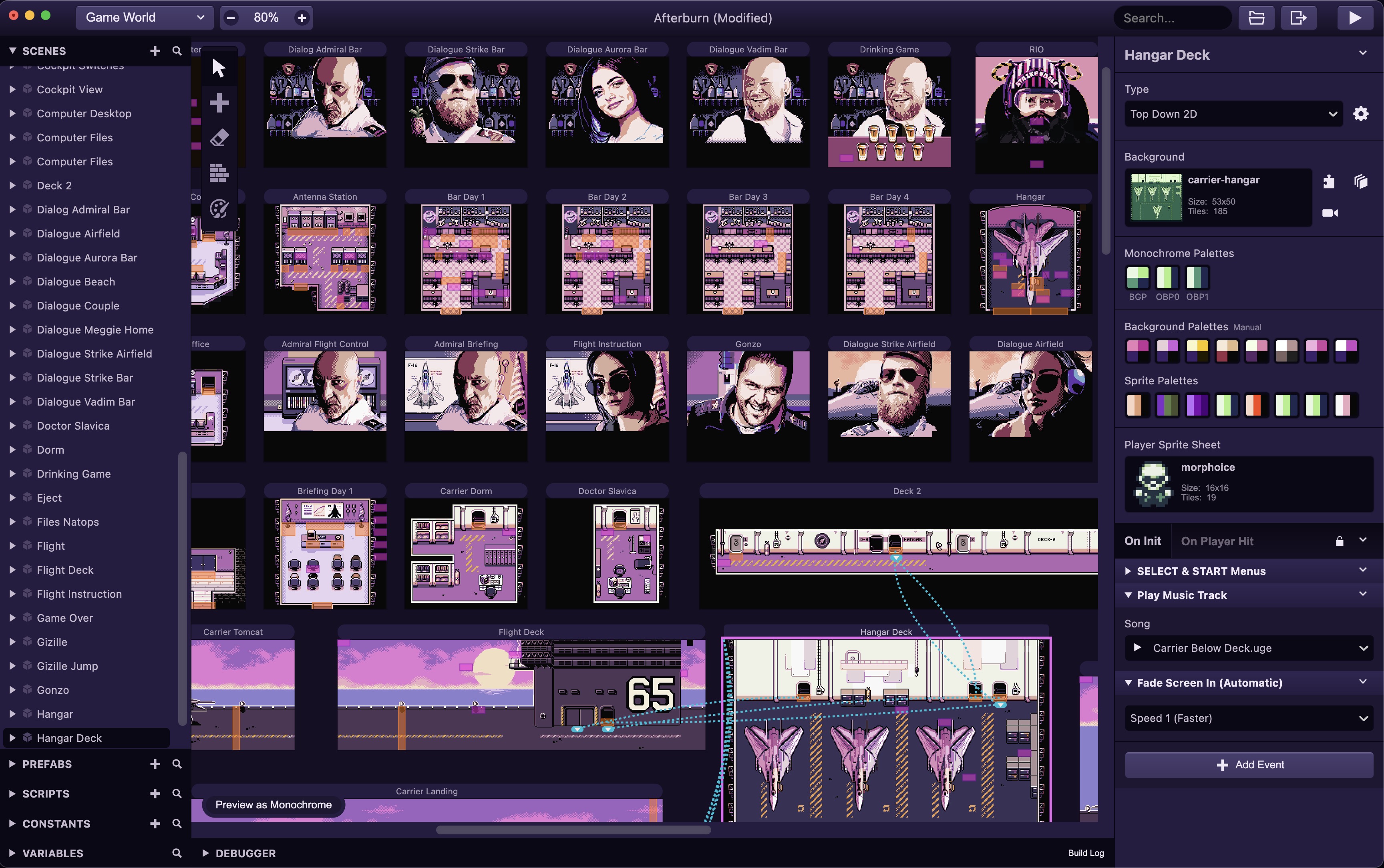
Dark IDE theme with subtle purple hues and pink highlights. Based on the default dark theme with desaturated purple tones across all panels, giving the editor a cohesive, easy-on-the-eyes look for long sessions.
Extract the
AfterburnTheme folder to your GB Studio global plugins directory:macOS:
~/Library/Application Support/GB Studio/plugins/Windows:
%APPDATA%/GB Studio/plugins/Linux:
~/.config/GB Studio/plugins/Then restart GB Studio and select Afterburn under View → Theme.
Handheld Camera
Engine Plugin GB Studio 4.2.xSmooth handheld camera sway and screen shake effect. Applies randomized, eased offsets to the scroll system to simulate organic camera movement — from subtle documentary-style drift to intense screen shake.
- Configurable amplitude (0–8 pixels per axis, set 0 to disable an axis)
- 5 speed presets: slow drift, normal sway, fast, faster, raw per-frame shake
- 4 smoothness levels with 8.8 fixed-point easing
- Independent X/Y axis control with de-synchronized intervals
- Three events: Start, Update (per-frame), Stop
Sprite Blink
Engine Plugin GB Studio 4.2.xPer-pixel eye blink animation for up to 2 actors via direct VRAM writes during VBlank. Adds realistic blinking to sprites with randomized timing for a natural appearance.
- 4 eye shapes: 1×1, 2×1 horizontal, 1×2 vertical, 2×2 L-shape
- Configurable pixel coordinates and blink color per actor
- Runs inside VBL_isr — zero CPU cost during active display
- Direction-locked: only blinks when actor faces down (front-facing)
- Scene-change safe with automatic stale slot detection
SmoothFade
Engine Modification GB Studio 4.2.x (CGB)Replaces the default harsh palette swap fade with smooth linear interpolation across all 64 CGB palette entries. Supports fade to white, black, or custom RGB color.
- Three speed presets: 8-step (fast), 16-step (medium), up to 32-step (slow)
- LUT-free inline interpolation (saves 96 bytes WRAM)
- CGB 5-bit per channel interpolation
- Deferred palette writes (compute during display, write at VBlank)
- Custom fade target RGB color via included event plugin
- Compatible with standard GB Studio fade events
ToneBeep
Sound / Audio GB Studio 4.2.xPatterned pulse-wave beep sequencer for warning tones, radar locks, and alert sounds. Runs on CH1 or CH2 with automatic music driver muting.
- 5 built-in warning patterns (status change, waterfall, radar uplink, missile approach, caution)
- Dual-channel independent operation (CH1 + CH2)
- Pattern step sequencer with frequency and duration
- Automatic SFX interrupt handling with auto-resume
- Per-frame update with volume control
NoiseDrone
Sound / Audio GB Studio 4.2.xContinuous noise channel drone generator with portamento pitch sliding. Uses the Game Boy’s CH4 noise channel for atmospheric drones, engine sounds, or environmental ambience.
- 23-step pitch table (205 Hz to 9362 Hz)
- Portamento sliding between pitches
- 15-bit LFSR (hiss) and 7-bit LFSR (buzz) modes
- Volume sliding independent from pitch
- Automatic music CH4 muting and SFX recovery
SetTextPalette
UI / Text GB Studio 4.2.x (CGB)Set the CGB palette and background fill color for text rendering. Fixes white spacer tiles that appear when drawing text on dark backgrounds.
- Select any of the 8 BG palettes (0–7) for text
- Choose between white or black background fill
- Essential fix for games with dark-themed UI
- Simple single-event plugin, no engine modifications
Zone
Event Plugin GB Studio 4.2.xRectangular zone check with enter/exit detection. Defines a tile-based rectangular area and fires callbacks when the player crosses the zone boundary.
- Tile-based zone definition (X, Y, Width, Height)
- State variable tracking (0=outside, 1=inside)
- Separate enter and exit event callbacks
- Auto-label showing zone coordinates in the editor