
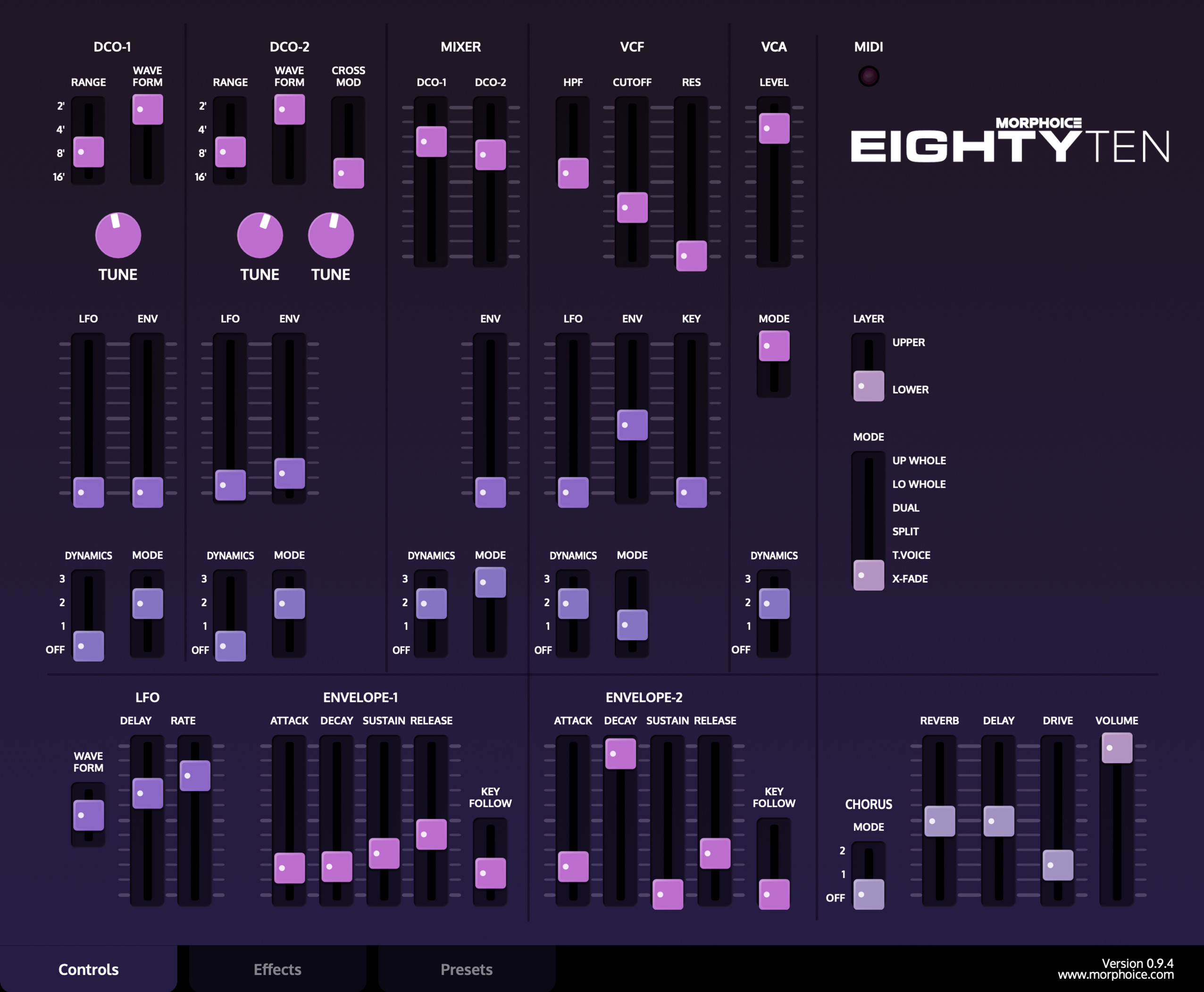
EightyTen models the Roland Super JX family (JX-10 and MKS-70), built on the same voice architecture as the JX-8P. Two independent Tones, an Upper and a Lower, play together as a Patch under a shared Key Mode. The synthesis engine, envelopes and chorus are calibrated against measurements of real hardware.
Installation | Licensing | Overview | Layer & Key Mode | DCO-1 / DCO-2 | Mixer | VCF / HPF | VCA | LFO | ENV-1 / ENV-2 | Chorus | Global Effects | Presets | Hardware / SysEx | Performance & MIDI
Download the latest version from the product page.
Run the installer (.pkg) and follow the steps. It places the plugin in the standard locations:
/Library/Audio/Plug-Ins/VST3//Library/Audio/Plug-Ins/Components/Run the installer (.exe) and follow the steps. It places the plugin in the standard location:
C:\Program Files\Common Files\VST3\Extract the ZIP archive and copy the plugin to:
~/.vst3/After installing, rescan your plugins in your DAW (most DAWs do this automatically on startup).
EightyTen comes from an independent developer and does not carry an Apple or Microsoft code-signing certificate. This is common for small independent software and is not a sign that anything is wrong with the download — the certificate only tells the operating system who published the software, not whether it is safe. Because the publisher is "unidentified", macOS and Windows may show a caution message the first time you run the installer. You only need to allow it once:
Unlicensed, EightyTen runs as a demo for a limited time. When the demo period ends, sound stops and the authorization dialog is shown.
To activate, enter your e-mail and serial in the authorization dialog. Validation is performed online against the license server. Once activated, the license is stored locally and works offline. The Buy button opens the product page.
An update check runs at start. The version display shows "Update available" when a newer version exists; clicking the version number opens the product page. Visit the EightyTen product page for downloads.
EightyTen models the Roland Super JX family (JX-10 and MKS-70), built on the same voice architecture as the JX-8P. Two terms are used throughout this manual:
The control sliders always edits one Tone (either UPPER or LOWER, depending on your selected LAYER).
The panel edits one Tone at a time. The Layer switch selects which Tone is shown: Upper (up) or Lower (down). Switching reloads the panel with that Tone's values; both Tones stay live.
The Key Mode slider has six positions (JX-10 terms):
| UP WHOLE | Only the Upper Tone plays across the whole keyboard. |
| LO WHOLE | Only the Lower Tone plays across the whole keyboard. |
| DUAL | Both Tones layered. |
| SPLIT | The Lower Tone plays below the split point, the Upper Tone from the split point up. |
| T.VOICE | The Upper or Lower Tone is chosen per note by how hard you play (velocity threshold). |
| X-FADE | A Dual variant; key velocity crossfades the balance between the two Tones. Play harder for less Lower; softer for less Upper. |
Sets the key where the Lower Tone ends and the Upper Tone begins in SPLIT mode. Range MIDI notes 21–108, shown as note names. Only visible while SPLIT is selected.
The two digitally controlled oscillators are set per Tone, for both the Upper and the Lower.
| Range | 16' / 8' / 4' / 2' | Pitch range in one-octave steps. 8' is standard. |
| Waveform | Noise / Square / Pulse / Saw | Output waveform of the oscillator. |
| Tune | ±12 | Pitch in semitone steps, up to one octave either way. |
| Fine Tune (DCO-2) | ±50 cent | Fine pitch of DCO-2 against DCO-1. A little detune thickens the sound. |
| LFO Depth | 0 to 99 | How much the LFO modulates the pitch. With the Sine LFO this is vibrato. |
| Envelope Depth | bipolar | How much the envelope modulates the pitch. |
| Envelope Mode | ENV-1 ∧ / ENV-1 ∨ / ENV-2 ∧ / ENV-2 ∨ | Which envelope drives the pitch, and its polarity. In ∨ the shape is inverted. |
| Dynamics | Off / 1 / 2 / 3 | How strongly key velocity affects the pitch envelope amount. |
| Cross Modulation | Off / Sync 1 / Sync 2 / X-Mod | See below. |
| Off | The two oscillators run independently. |
| Sync 1 | DCO-2 is hard-synced to DCO-1. |
| Sync 2 | Sync and ring modulation together. |
| X-Mod | Cross and ring modulation between the two oscillators. |
The Mixer balances the two oscillators. Its envelope acts on the DCO-2 level only, as on the hardware.
| DCO-1 Level | 0 to 99 | Level of oscillator 1. |
| DCO-2 Level | 0 to 99 | Level of oscillator 2. |
| Envelope Depth (MIX ENV) | bipolar | Fades DCO-2 in or out over the note under envelope control. |
| Envelope Mode (MIX MODE) | ENV-1 ∧ / ENV-1 ∨ / ENV-2 ∧ / ENV-2 ∨ | Envelope source and polarity for the DCO-2 level. |
| Dynamics (MIX DYNA) | Off / 1 / 2 / 3 | How strongly key velocity affects the DCO-2 level envelope. |
| HPF Cutoff | Off / 1 / 2 / 3 | High-pass filter. Higher settings remove more low end. |
| Cutoff Frequency | 0 to 99 | Low-pass cutoff. Lower settings darken the sound, down to silence. |
| Resonance | 0 to 99 | Emphasis at the cutoff point. Higher settings sound sharper and more electronic. |
| Envelope Depth | bipolar | Envelope sweep of the cutoff on each note. |
| Envelope Mode | ENV-1 ∧ / ENV-1 ∨ / ENV-2 ∧ / ENV-2 ∨ | Envelope source and polarity for the cutoff. |
| Dynamics | Off / 1 / 2 / 3 | How strongly key velocity affects the filter envelope. |
| LFO Depth | 0 to 99 | LFO modulation of the cutoff. |
| Key Follow | 0 to 99 | Cutoff tracks key position. At maximum the tone stays consistent across the keyboard. |
| VCA Level | 0 to 99 | Tone volume. Set very high it can distort, as on the hardware. |
| VCA Mode | ENV-2 / Gate | Volume shaped by ENV-2, or an organ-like on/off Gate. |
| Dynamics | Off / 1 / 2 / 3 | How strongly key velocity affects the volume. |
| Waveform | Random / Square / Sine | LFO output waveform. |
| Delay Time | 0–14 s | Delay before the LFO reaches full depth after a key is pressed: a silent hold, then a gradual fade-in. No effect in the lower third of the range, as on the hardware. |
| Rate | 0.012–23 Hz | Speed of the LFO. Exponential, matched to the hardware sweep. |
The two envelopes are identical in structure. Their timing is calibrated against real hardware; at the shortest attack the sound is fast and percussive, as on the original.
| Attack Time | 0–22 s | Time to rise to maximum after a key is pressed. At the shortest attack the sound is fast and percussive, as on the original. |
| Decay Time | 0–23 s | Time to fall from maximum to the sustain level. |
| Sustain Level | 0–99 | Level held while the key stays down. |
| Release Time | 0–20 s | Time to fall to zero after the key is released. |
| Key Follow | Off / 1 / 2 / 3 | Higher keys get shorter envelope times. |
The Super JX BBD chorus is set per layer, modeled from the service schematic and measurements of real hardware. Chorus Mode is Off / I / II. Mode I sweeps at 0.81 Hz and is expansive; Mode II sweeps at 1.21 Hz and is richer. The delay is swept over roughly 1.2 to 3.7 ms, with the stereo behavior of the measured unit.
These controls apply to the whole Patch, both layers together.
| Volume | Master output level. |
| Drive Level | Amount of drive and saturation on the output. |
| Level | Volume of the delayed signal. | |
| Time | 1–2000 ms | Delay time. With Sync on, set in host-tempo divisions. |
| Feedback | 0–200 % | Number of repeats. |
| Modulation | 0–100 % | Tape-style wobble on the repeats. |
| Drive | 0–24 dB | Saturates the repeats. |
| Low Cut | 10 Hz–2 kHz | Removes low end from the repeats. |
| High Cut | 200 Hz–20 kHz | Removes high end from the repeats for a darker echo. |
| Sync | Locks the delay time to the host tempo. |
| Level | Volume of the reverb. | |
| Decay | Length of the reverb tail. | |
| Pre-Delay | 0–500 ms | Gap before the reverb starts, keeping the note's attack clear. |
| Darkness | Tames the high end of the tail. | |
| Sparkle | Adds an octave-up shimmer voice in the tail. | |
| Sparkle Pitch | ±24 semitones | Tunes the shimmer voice. |
| Delay into Reverb | How much of the delay output feeds the reverb. |
EightyTen has its own preset browser built into the interface. There are two kinds of banks:
| Patches | Both Tones plus the patch-level settings. |
| Tones banks | A single Tone into the currently selected layer only. Everything else stays as it is. |
63 patches converted from original hardware are included.
EightyTen talks to real Roland JX-8P, JX-10 and MKS-70 hardware over SysEx. The controls live in the Settings panel.
| MIDI Device | Selects the MIDI device your hardware is connected to. Choose "Not Connected" to disconnect. The selection is remembered across sessions. |
| Rescan | Re-scans the system for connected MIDI devices and refreshes the list. |
| Load .SYX File | Opens a file browser for .syx files. The file is scanned for Super JX tones and patches, and the status line reports what was found. If the file holds exactly one tone, it is applied to the panel straight away. The folder is remembered for next time. |
| Send .SYX to Hardware | Transmits the loaded .syx file to the hardware, one message at a time so the instrument can keep up. Available once a file is loaded. |
| Convert to Presets | Saves every tone and patch in the loaded file as plugin presets, under Imported Tones and Imported Patches in the browser. A bank goes into a subfolder named after the file, and duplicate names are numbered. Your panel is restored afterwards. Available once a file is loaded. |
| Send Edit | Sends the current Upper Tone, exactly as shown on the panel, to the hardware as a full tone dump. |
Once a MIDI device is selected, EightyTen and the hardware follow each other in real time, so the plugin works as a programmer for the instrument and the instrument's own controls drive the plugin.
| Plugin to hardware | Every edit you make on the Upper layer is sent to the hardware at once as a single parameter change. Lower-layer edits are not sent, since the JX-8P has a single tone. |
| Hardware to plugin | Parameter edits and full tone dumps sent from the hardware are applied to the currently selected layer. The status line shows an incoming dump's tone name, and the in/out LEDs indicate SysEx activity. |
| Patches | An imported patch carries its name, both Tones, Key Mode, split point and balance. Applying it sets all of these. |
| Pitch Bend | Fixed range of ±2 semitones. |
| Sustain Pedal | Responds to the sustain pedal (MIDI CC 64). |
| Host Automation | All 52 controls are available to your DAW for automation, each under a name that matches the panel (for example DCO 1 Range, VCF Cutoff, Env 1 Attack, Key Mode, Layer). |
| MIDI Learn | Right-click any control to assign it to a MIDI CC. |
| Tooltips | Hover or drag any control to see its name and current value. |
| Oscillators | Free running. |
For downloads, licensing, audio demos, and factory presets visit the product page:
EightyTen Product PageRoland and the Roland product names mentioned on this page are trademarks of Roland Corporation, used for identification only. Not affiliated with or endorsed by Roland.